Kestrel's Cameras and Studio Equipment
- Published:
- Length: 632 words
- Reading Time: 4 minutes
A few years ago, I published a series of blog posts about what stuff I use in my studio. Links to those other blog posts are here:
- Computer and Sewing Machines
- Sewing Tools
- Storage and Organizers
- Cricut Supplies
- Lights and Suspension System
The one thing I did not cover back then is what equipment I use to record my videos, and in the spirit of continuing to document the hardware in my sewing room, I've compiled that list below.
Recording Stuff
AnkerWork M650 Wireless Lavalier Microphone Link I like this microphone because it captures good audio and it’s wearable, which means I can move around my space and not be tied to my table. I do have to be careful about managing other sounds (like not recording when the grass is being cut, or making sure the dogs aren’t chewing on bones).
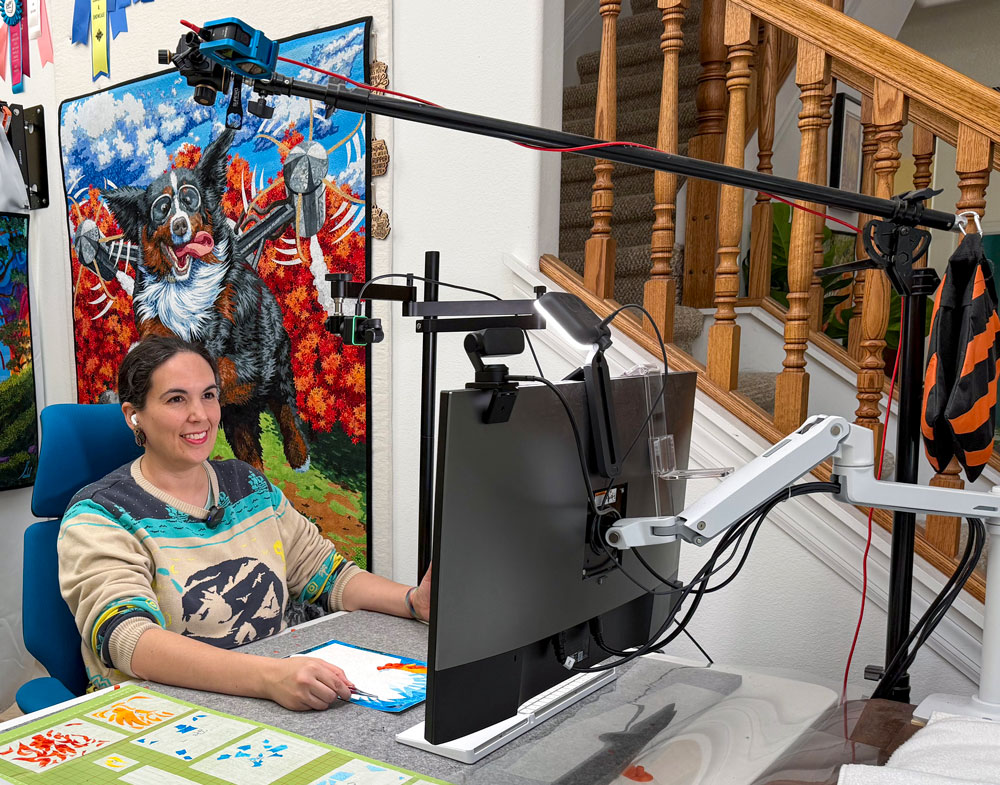
GoPro Hero 9 Black Link I got this camera initially for on-location recording outside my studio, but these days I mostly it as an overhead camera that captures my entire worktable. It’s suspended on a ball-head mount on a tripod arm.
Insta360 Link Webcam Link I use this webcam primarily for top-down recording of projects on my worktable. I’ve also used it to record my sewing needle while quilting. It’s great quality, portable, and the gimbal makes it easy to position.
Insta360 Link 2 Webcam Link This is a newer model of the other webcam. Functionality is mostly the same, and I keep this one on my monitor at all times to serve as my primary face cam for Zoom calls and recording.
ULANZI Camera Desk Mount Stand with Flexible Arm Link This mount is so great, I purchased two of them. It’s perfect for suspending a camera over my work area to record a top-down view of my project. But a word of caution: it’s more unstable the further out the arm extends, which is only a problem if the mount is clamped to the table on which you’re working (bumping the table will bump the camera). I also wouldn’t recommend it for supporting a heavy camera, but the small webcam is perfect.
Logitech for Creators Litra Glow Premium LED Streaming Light Link I use this small key light for extra light on my face or on my project.
Recording Software
Open Broadcasting Software (OBS) Link This is a free, open-source software that many streamers use to broadcast their live video content. I use it for recording, because I can combine multiple camera feeds into one view. I can also use it for Zoom calls (ie. live, online demonstrations) if I want to keep my video visible while demonstrating. (Zoom treats the OBS output as a camera source I can select in the Zoom settings.)
Insta360 Link Controller This software comes with the Insta360 webcams. It gives access to features like zoom, enabling the camera’s tracking, gesture controls, auto/manual focus, etc. Adobe Premier Pro Notes: This is my editing software. It’s excellent editing software, but not a must-have in order to start making videos. Whatever editing software you use, make sure it has a way to auto-find and remove filler words and pauses. That will save you hours of time when preparing your videos.